
Basic Concepts
Invox Dictation is made up of a set of elements to provide feedback to the user.
Before you start using the API, you should understand the purpose of each element and how to integrate it into your web application.
Progress Bar
The Progress Bar displays the download percentage of required resources and messages of the user authentication process.
Status Bar
The Status Bar displays messages about the current session. Among these are messages related to the state of the recognizer, the authentication process or possible errors with the dictation service.
Audio Level Indicator
The Audio Level Indicator, or VUMeter, displays feedback from the microphone to the user. In this way, the user will be able to verify that audio is being received correctly.
Recognizer
The Recognizer takes care of recognition when it is in the active state. This element works like a microphone that can be turned on or off — it can be picking up the user's audio to turn it into text, or it can be paused.
It has two states:
- Active: the recognizer is listening to the audio.
- Paused: the recognizer is stopped and is not listening to audio.
Hypothesis Viewer
The Hypothesis Viewer is used to display the audio-to-text translation process performed by the recognition engine.
During dictation, it allows you to observe in real time the evolution of the recognized text. This translation is called a hypothesis, and five types are distinguished: partial, rejected, command, macro and accepted.
TextWriter
Invox Dictation must know how to perform write operations on an editor or any target element.
The TextWriter is responsible for performing the basic operations in a text editor. It works as a proxy that references the editor instance and allows Invox Dictation to type the recognized text, move through the text using voice commands, select words or entire lines, delete text, redo, undo, etc.
For example, if your web application uses CKEditor 5, there must be a TextWriter that knows how to perform the basic operations in that particular editor.
See the Writers section for implementation details.
Component overview
The following image shows all components available in the Invox Dictation SDK:
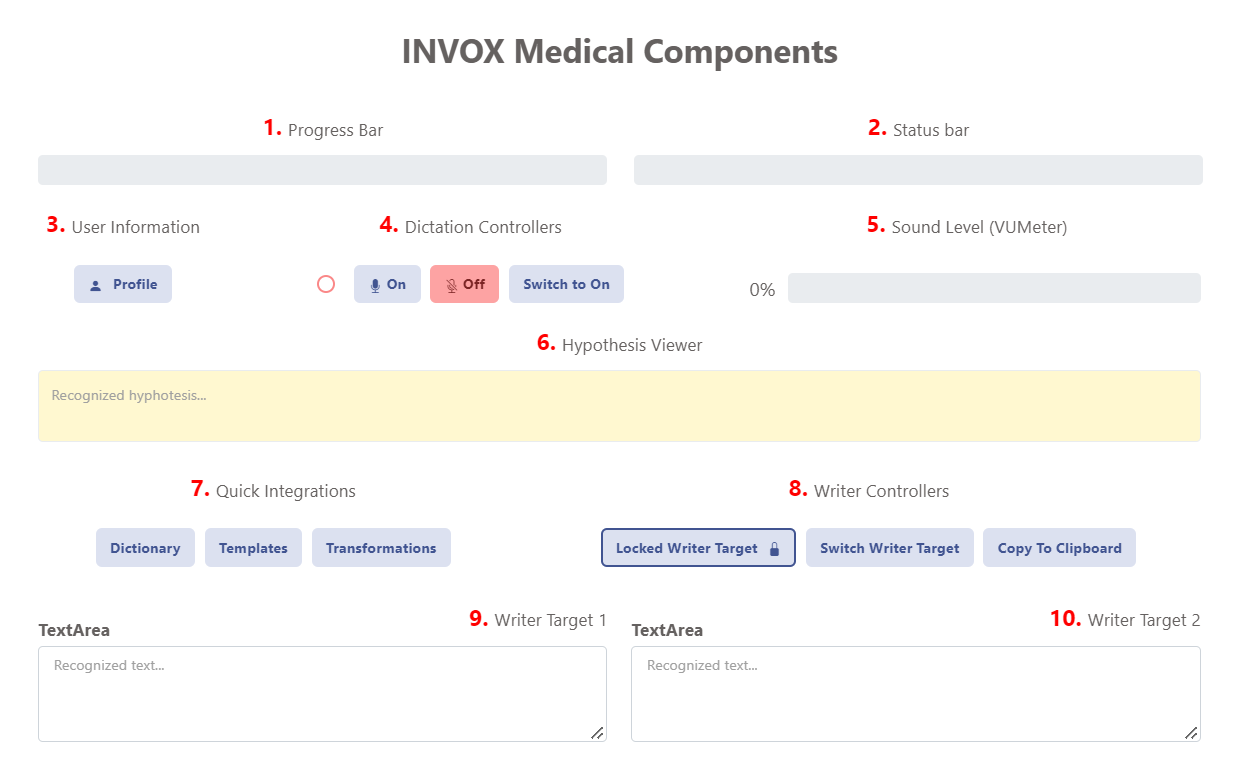
- Progress Bar
- Status Bar
- User Information
- Dictation Controllers (on/off/switch)
- Sound Level (VUMeter)
- Hypothesis Viewer
- Quick Integrations (Dictionary, Templates, Transformations)
- Writer Controllers
- Writer Target 1
- Writer Target 2