
Local Dictation Service
Description
It provides the necessary tools to integrate Invox Dictation speech recognition and all its functionalities in a web environment.
The API provides from the most basic and essential functions to be able to log in and dictate in simple steps, to advanced functions to control dictation, obtain session information or even customize the behaviour of Invox Dictation components. All the low-level details related to speech recognition are hidden from the integrator.
The Local Dictation Service contains the Invox Dictation voice recognition engine, which must be installed on the customer's equipment.
Integration architecture
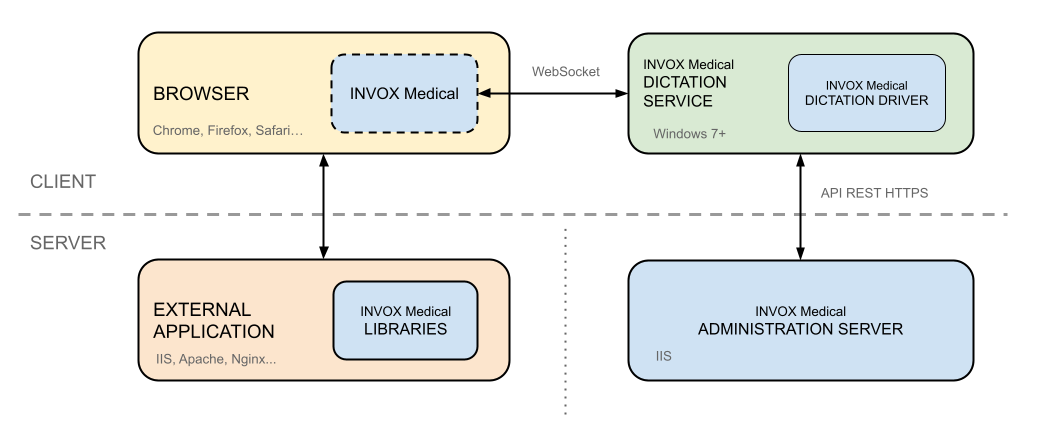
Deployment on clients
If you have opted for the Local Dictation Service scenario, you will need to request the installers from https://support.invoxmedical.com/.
You can also find the installers at https://sdk.invoxmedical.com/sdkportal28/Downloads.
- Install the Dictation Drivers on the customer's operating system:
InvoxMD_DictationDriver_DD_Install_X.X.X_x64.exe (64 bits) - Install the Local Dictation Service on the customer's operating system:
InvoxMDAgent_XXX_CL_Install_X.X.X_x64.exe (64 bits)
Integration into the external application
To include Invox Dictation in your web application, import the library and execute the essential functions.
Steps to perform
- Import the Invox Dictation library into your web application.
Thelibs/invox.min.jsfile contains all the necessary functionality. The following HTML block shows how to import it:<head> <script type="text/javascript" src="libs/invox.min.js" charset="UTF-8"></script> </head>The Opus librarylibs/opus/is not used by the Local Dictation Service.
- Install the Local Dictation Service.
Ensure that the Local Dictation Service has been installed and is functioning correctly.
- Start integrating Invox Dictation into your application.
You can start with the Quick Start guide or use the Quick Integrations to accelerate deployment.
Remarks
Logging
See the Local Dictation Service Logs section for details.