
Remote Dictation Service
Description
It provides the tools necessary to integrate Invox Dictation speech recognition and all its functionalities into a web environment.
The API provides from the most basic and essential functions to be able to log in and dictate in simple steps, to advanced functions to control dictation, obtain session information or even customise the behaviour of Invox Dictation components. All the low-level details related to speech recognition are hidden from the integrator.
The Invox Dictation speech recognition engine is deployed on a server, so no additional installations are required on the customer's equipment.
Integration architecture
Deployment on clients
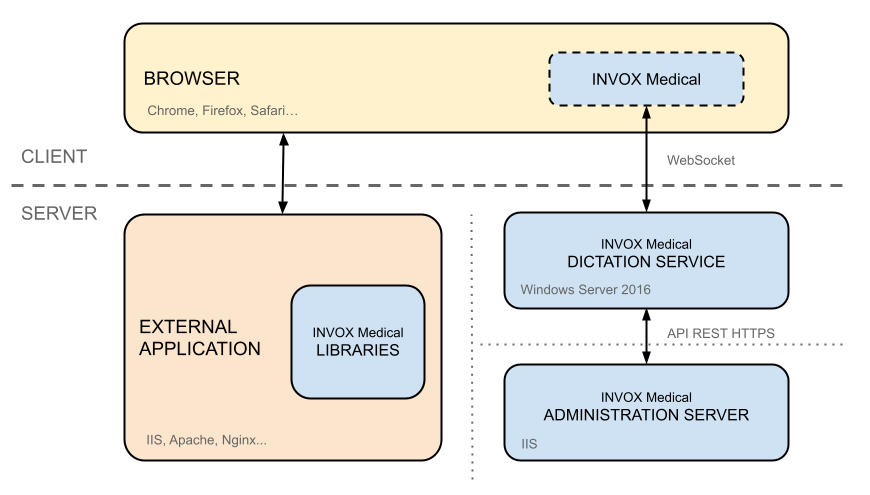
No installation on clients is required to deploy the integration. The client web application connects to the Remote Dictation Service via a WebSocket connection.
Integration into the external application
To include Invox Dictation in your web application, import the library and execute the essential functions.
Steps to perform
- Import the Invox Dictation library into your web application.
Thelibs/invox.min.jsfile contains all the necessary functionality. The following HTML block shows how to import it:<head> <script type="text/javascript" src="libs/invox.min.js" charset="UTF-8"></script> </head>The Opus librarylibs/opus/is mandatory for the Remote Dictation Service. Invox Dictation will automatically reference thelibs/opus/directory — keep the same folder structure:|-invox.min.js |-opus/
- Install and import the Invox Dictation SDK into your web application.
Install the SDK via npm:npm install @invox-medical-npm/invox-dictation
Import it using ES modules in your application entry point:import INVOX from "@invox-medical-npm/invox-dictation";The Opus audio library is bundled within the main ESM module — no manual copy step required. Component styles are auto-injected at runtime.
- Enable MIME type wasm on the dictation server.
This MIME type is necessary to send audio from the browser with HTML5.- Open Internet Information Services Manager (IIS).
- Open MIME Types.
- Right-click, select Add... and set:
Field Value File name extension .wasmMIME type application/wasm
- Start integrating Invox Dictation into your application.
You can start with the Quick Start guide or use the Quick Integrations to accelerate deployment.
- Start integrating Invox Dictation into your application.
You can start with the Quick Start guide or use the Quick Integrations to accelerate deployment.
Remarks
Logging
See the Remote Dictation Service Logs section for details.