
Direct Dictation Service
Invox Dictation SDK 2.9.1 is a web integration with no Local Dictation Service installed on client devices. The SDK authenticates the user through Corporate Server and manages the Direct Dictation connection after login.
Integration architecture
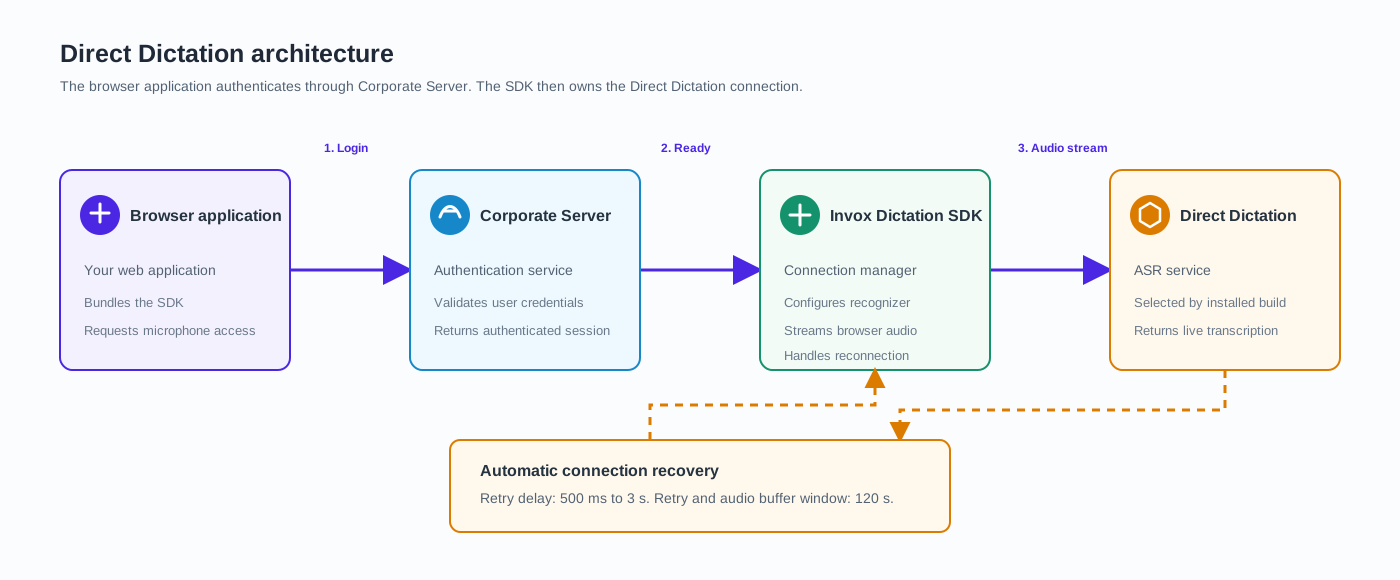
The application bundles the SDK, initializes it with organizationId, appId, and apiKey, then authenticates through Corporate Server. Once the session is ready, the SDK opens the ASR connection selected by the installed build and manages its recovery.
Client deployment
No Dictation Service, microphone driver, or local installer is required on the client. Deploy the web application over HTTPS and request microphone permission through the browser.
If your integration uses wake-word detection, serve the SDK wake-word-assets from the application origin or set wakeWordAssetBaseUrl. Configure your web server with the correct MIME types for .wasm and .onnx files.
Integrate the SDK
- Install the package:
npm install @invox-medical-npm/invox-dictation - Initialize the SDK, register
CustomizeComponents, then callLoginwith the user credentials. - Select a writer target and start dictation. See Quick Start for a complete custom integration and Quick Integration Components for the ready-made UI components.
Connection recovery
The SDK automatically retries transient ASR connection failures. Integrations should show recovery state through OnReconnectingRecognizer and request a new login only after LOGIN_ERROR. See Session Management for recovery timing and terminal failure behavior.
Logging
See Browser Logs for the logs available to a web integration.